
Note
Go to the end to download the full example code.
POV-Ray rendered crystal structure#
Here, we show POV-Ray rendered images as shown in ase.spacegroup.
As an example, we start from a skutterudite structure.
This structure is visualised with the Cobalt atoms on the
corners. This can easily be accomplished with ASE using
ase.build.cut(). Below is the origo argument used to
put the Cobalt atom on the corners and extend to include all corner
and edge atoms, even those belonging to neighbouring unit cells.
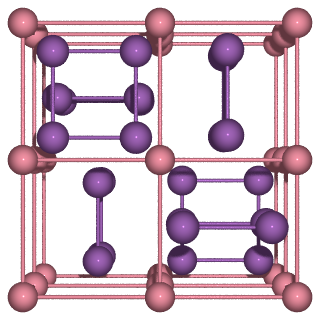
PosixPath('/builds/ase/ase-deploy/examples/gallery/spacegroup-cosb3.png')
import ase.io as io
from ase.build import cut
from ase.spacegroup import crystal

a = 9.04
skutterudite = crystal(
    ('Co', 'Sb'),
    basis=[(0.25, 0.25, 0.25), (0.0, 0.335, 0.158)],
    spacegroup=204,
    cellpar=[a, a, a, 90, 90, 90],
)

# Create a new atoms instance with Co at origo including all atoms on the
# surface of the unit cell
cosb3 = cut(skutterudite, origo=(0.25, 0.25, 0.25), extend=1.01)

# Define the atomic bonds to show
bondatoms = []
symbols = cosb3.get_chemical_symbols()
for i in range(len(cosb3)):
    for j in range(i):
        if symbols[i] == symbols[j] == 'Co' and cosb3.get_distance(i, j) < 4.53:
            bondatoms.append((i, j))
        elif (
            symbols[i] == symbols[j] == 'Sb' and cosb3.get_distance(i, j) < 2.99
        ):
            bondatoms.append((i, j))

# Create nice-looking image using povray
renderer = io.write(
    'spacegroup-cosb3.pov',
    cosb3,
    rotation='90y',
    radii=0.4,
    povray_settings=dict(
        transparent=False,
        camera_type='perspective',
        canvas_width=320,
        bondlinewidth=0.07,
        bondatoms=bondatoms,
    ),
)

renderer.render()